If you need urgent consulting help click here
Olimex LoRa STM32WL DevKit
Overview
LoRaWAN development kit based on Olimex BB-STM32WL module using the STM32WLE5CCU6 MCU.
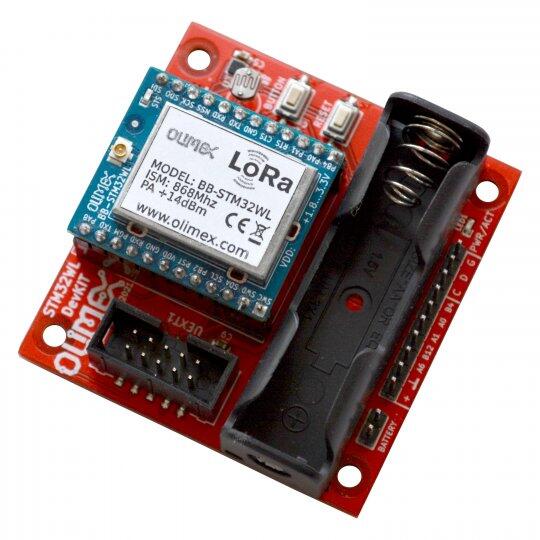
Fig. 131 Olimex LoRa STM32WL DevKit (credit: OLIMEX)
Hardware
The board has below hardware features:
BB-STM32WL, 256KB Flash, 64KB RAM with external antenna
Lithium battery connector 3V (does not include battery)
UEXT connector for external sensors
BMA280 temperature, humidity, pressure sensor
LDR resistor for lighting measurement
IIS2MDCTR 3-axis magnetometer for smart parking
GPIO connector for prototyping
Low power design
1 User LED
1 user, 1 boot, and 1 reset push-button
32.768 kHz LSE crystal oscillator
More information about the board and the module can be found here:
Supported Features
The Zephyr Olimex LoRa STM32WL Dev Kit configuration supports the following hardware features:
Interface |
Controller |
Driver/Component |
|---|---|---|
ADC |
on-chip |
adc |
AES |
on-chip |
crypto |
COUNTER |
on-chip |
rtc |
CLOCK |
on-chip |
reset and clock control |
FLASH |
on-chip |
flash |
GPIO |
on-chip |
gpio |
I2C |
on-chip |
i2c |
MPU |
on-chip |
arch/arm |
NVIC |
on-chip |
arch/arm |
PINMUX |
on-chip |
pinmux |
RADIO |
on-chip |
LoRa |
SPI |
on-chip |
spi |
UART |
on-chip |
serial port-polling; serial port-interrupt |
WATCHDOG |
on-chip |
independent watchdog |
Other hardware features are not yet supported on this Zephyr port.
The default configuration can be found in the defconfig and dts files:
Programming and Debugging
Applications for the olimex_lora_stm32wl_devkit board configuration can be built the
usual way (see Building an Application).
The board contains an on-board debug probe which implements the CMSIS-DAP interface.
It can also be debugged and flashed with an external debug probe connected to the SWD pins.
The built-in debug probe works with pyOCD, but requires installing an additional pack to support the STM32WL:
$ pyocd pack --update
$ pyocd pack --install stm32wl
Flashing an application
Connect the board to your host computer and build and flash an application.
# From the root of the zephyr repository
west build -b olimex_lora_stm32wl_devkit samples/hello_world
west flash
Run a serial terminal to connect with your board. By default, usart1 is
accessible via the the built-in USB to UART converter.
$ picocom --baud 115200 /dev/ttyACM0